


Ultimate Live Security Suite
360 v10.6
Supported OC Ver 3.X
The Ultimate Security & Analytics
Command Center for OpenCart
Transform your OpenCart admin into a
powerful, real-time command center and give your store the iron-clad protection
it deserves. This is more than just an activity logger; it's a complete,
all-in-one suite designed to provide total insight and proactive security.
See Everything, Instantly:
Stop guessing and start knowing. Our live dashboard gives you the pulse of your
store with:
- Real-Time KPI Dashboard: Watch sales, new customers,
returns, low-stock alerts, and security incidents update live.
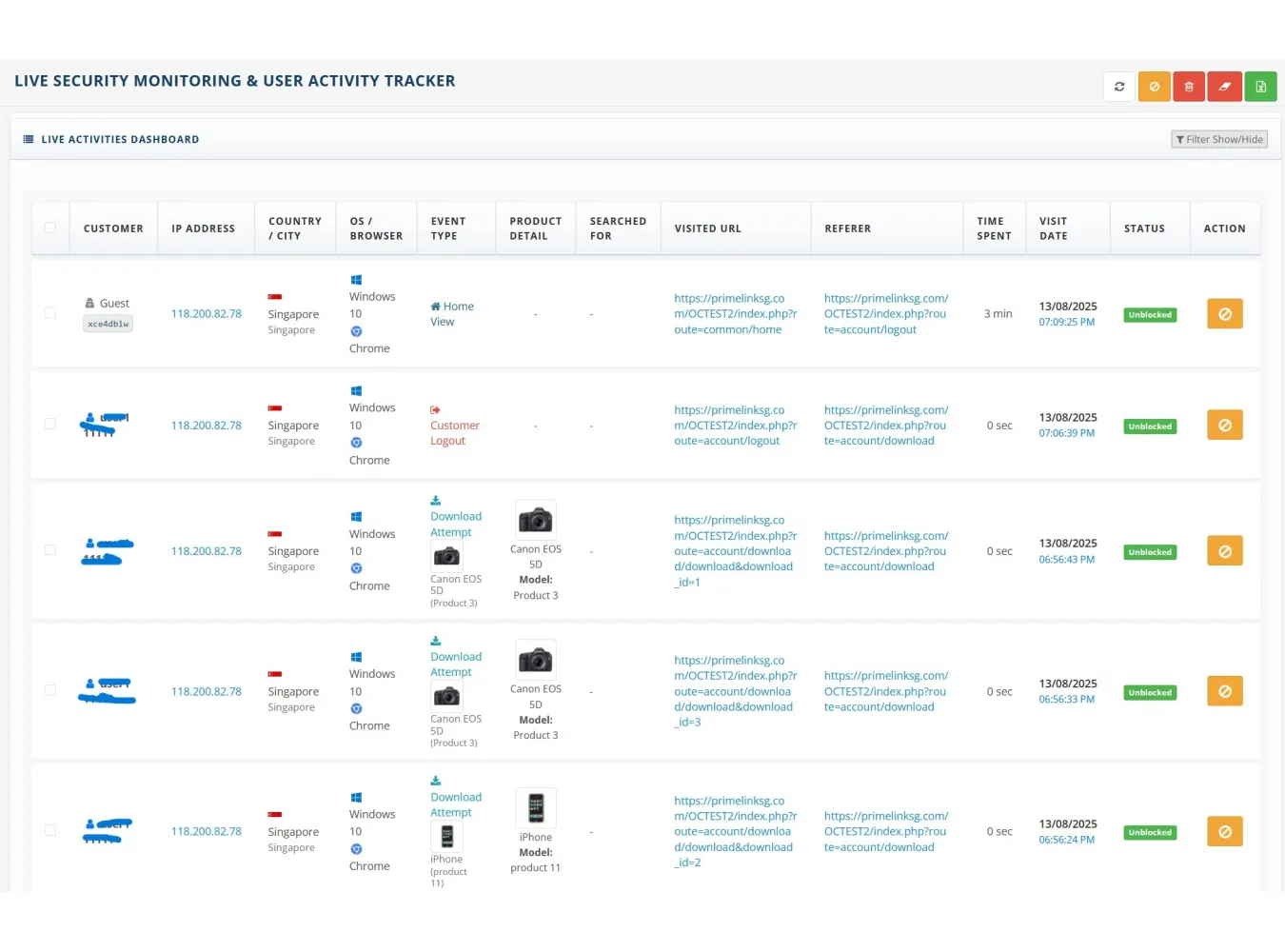
- Live Activity Feed: See every customer’s action, bot
visit, and security event as it happens, with instant filtering by
category.
- In-Depth Logs: Dive deep into the most detailed activity
log available. Filter by customer, IP, location, device, event, and more
to understand user behavior or investigate issues.
Block Threats, Automatically:
Sleep soundly knowing your store is protected by a
multi-layered security fortress:
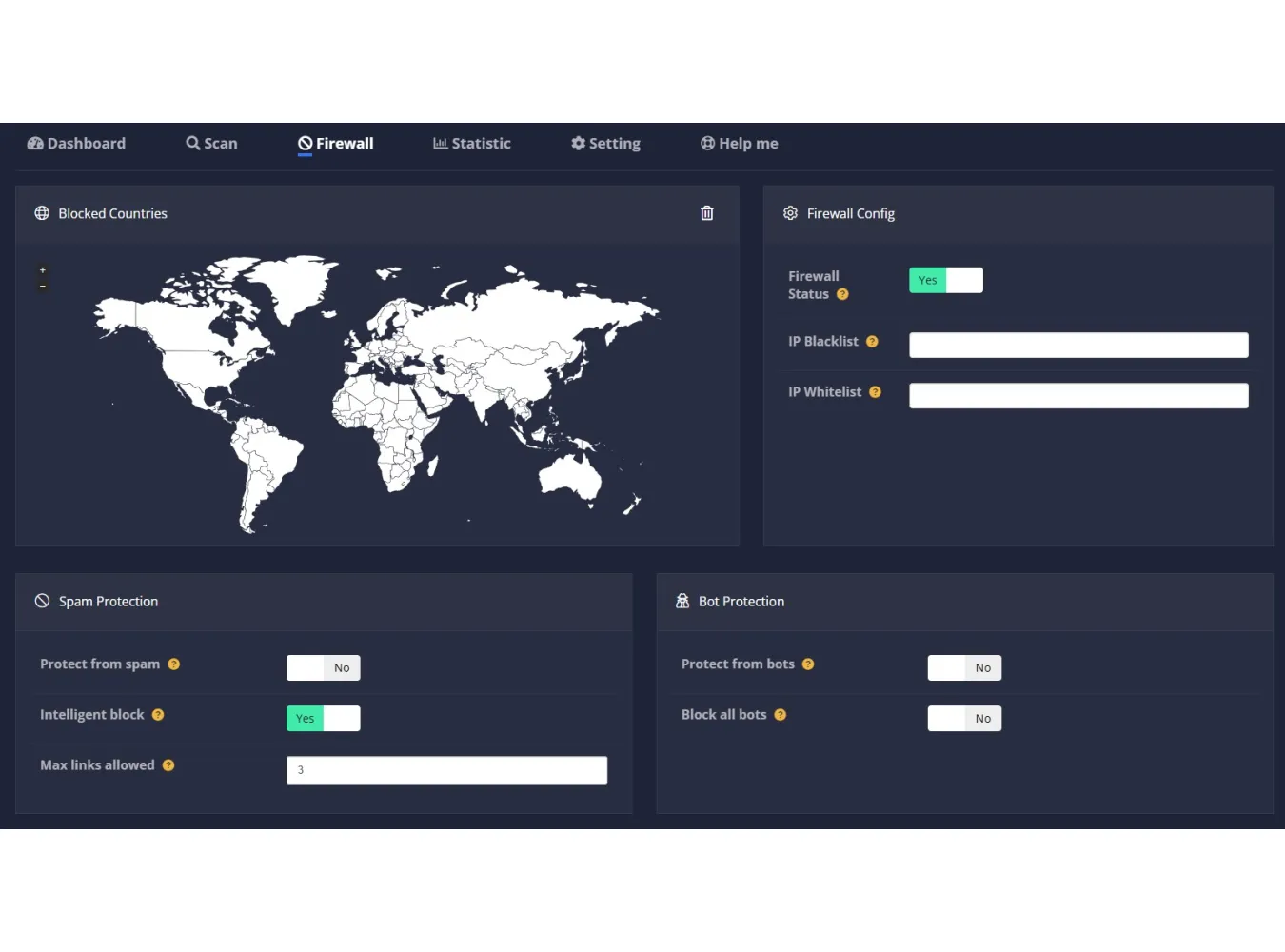
- Web Application Firewall (WAF): Proactively block bad
bots, brute-force login attacks, and site-crashing HTTP floods.
- Intelligent Threat Defense: Automatically detect and
neutralize hacking attempts like SQL injections and file injections.
- On-Demand Malware Scanner: Hunt down and identify
malicious files anywhere in your store's code with our powerful scanner.
- One-Click IP Blocking: Instantly ban suspicious IPs
directly from the activity log.
Take Control, Boost Sales:
Gain unparalleled control over your store's
security and performance:
- Secure Your Admin: Easily rename your
vulnerable admin folder and add a second-layer Secret
Key to your login page, making it virtually impenetrable.
- Recover Lost Sales: Go beyond a simple list of abandoned
carts. Our unique session timeline shows you the entire story of
a customer's journey, helping you identify issues and recover revenue.
- Customizable & Actionable: From
generating .htaccess rules to customizing log columns, every
feature is built to give you actionable data and effortless control.
This is the only extension you
need to truly monitor, protect, and understand your OpenCart store. Get
total control and peace of mind today!
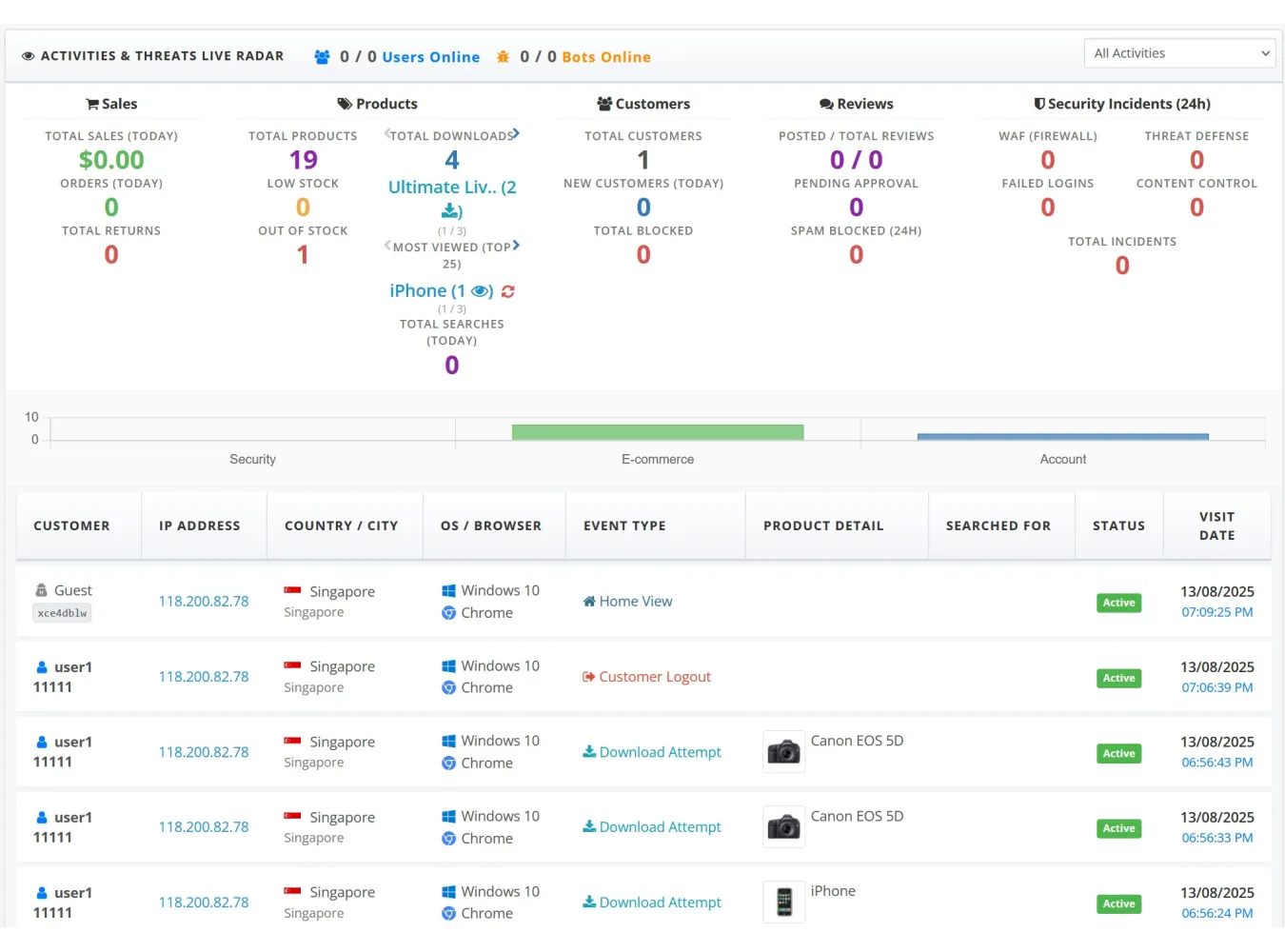
I. Dashboard Widget: Real-time Activity
& KPI Monitoring
This component provides a live, at-a-glance
overview of store activity directly on the OpenCart admin dashboard.
A. Core Functionality & Features
- Real-time Updates: The widget
automatically polls for new data every 15 seconds, refreshing the activity
log, KPIs, and online user counts without needing a page reload.
- Live Activity Filtering: A
dropdown menu allows the admin to instantly filter the activity feed by
category: All Activities, Security Events, E-commerce Events, Account
Events, or Search Events.
- Dynamic Chart: A bar chart
visualizes the volume of activities in the last 24 hours, segmented into
Security, E-commerce, and Account events. The chart dynamically updates
when the live filter is changed.
- Online User Tracking: Displays
a live count of currently online registered users/guests and a separate
count for online bots. It also shows the total unique users and bots for
the day.
- View All Link: A persistent
link directs the admin to the full, detailed activity log page.
B. Key Performance Indicators (KPIs) Bar
The widget features a comprehensive KPI bar
that summarizes crucial store metrics for the current day.
- Sales Group:
- Total Sales: Formatted value
of all completed orders.
- Orders: Total number of
completed orders.
- Returns: Total number of
return requests.
- Products Group:
- Total Products: The total
number of products in the catalog.
- Low Stock: Count of products
that have reached the configured low stock threshold.
- Out of Stock: Count of
products with zero quantity.
- Total Downloads: Total number
of product file downloads.
- Most Viewed: An interactive
display showing the most viewed products one by one, with navigation
arrows. It includes the product name, view count, and a link to the
product's edit page. It also features a button to reset the view count
for the displayed product.
- Total Searches: The total
number of searches performed on the storefront.
- Customers Group:
- Total Customers: Total number
of registered customers.
- Registered: Number of new
customer registrations today.
- Blocked: Total number of
unique IPs in the firewall blocklist.
- Reviews Group:
- Posted / Total: A ratio of
approved reviews versus the total number of reviews.
- Pending: Number of reviews
awaiting approval.
- Spam: Number of reviews
identified and blocked as spam.
- Security Group:
- WAF Incidents: Count of
blocks from the Web Application Firewall (e.g., HTTP Flood, Bad Bots).
- Failed Logins: Count of
failed customer and admin login attempts.
- Threat Defense: Count of
blocks from intelligent threat detection (e.g., SQL Injection attempts).
- Content Control: Count of
blocks from content-related rules (e.g., spam comments).
- Total Incidents: A sum of all
security-related incidents.
C. Real-time Activity Log (Widget View)
This is a condensed version of the main
log, designed for the dashboard.
- Configurable Columns: The
admin can choose which columns to display, including Customer, IP,
Geolocation, Device, Event, Product, Search, Status, and Date.
- Dynamic Row Updates: New
activities appear at the top of the list in real-time, pushing older
entries down. The list is capped at a configurable limit (e.g., 5 or 10
rows).
- Detailed Customer Info:
- Displays customer's name for registered users, or
"Guest".
- Identifies known bots like "Googlebot" and
"Bingbot", as well as generic "Bot/Crawler" traffic.
- Shows a unique icon for each type of visitor (user, guest,
bot).
- Event-Specific Details: Provides
context-rich information for each log entry, such as the product image and
name for cart events.
- Status Indicator: Shows
whether the visitor's IP is
currently Active or Blocked by the firewall.
D. Configuration & Settings
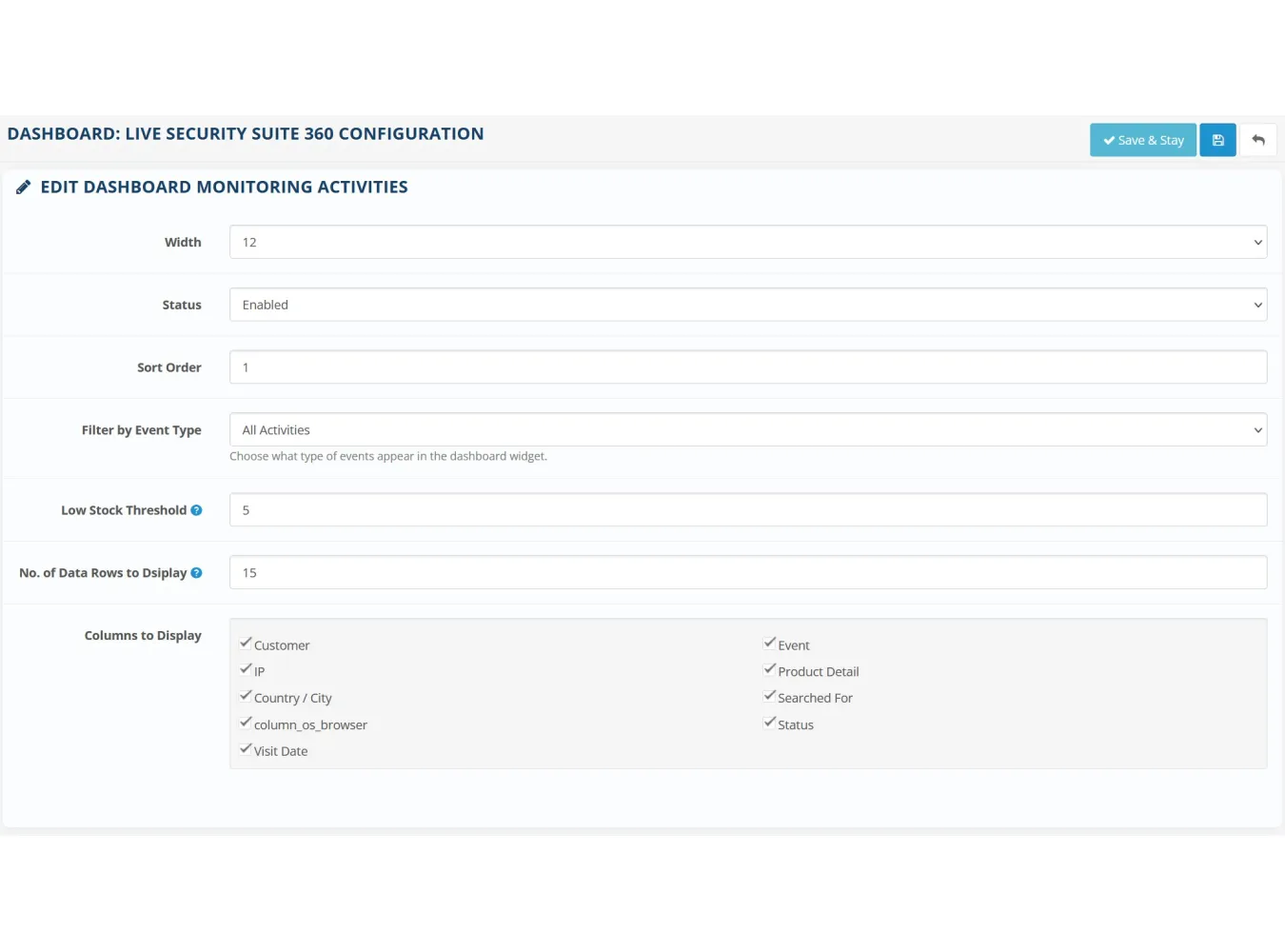
These settings control the appearance and
behavior of the dashboard widget itself.
- Width: Set the column width of
the widget on the dashboard (from 3 to 12).
- Status: Enable or disable the
entire dashboard widget.
- Sort Order: Determine the
widget's position relative to other dashboard widgets.
- Event Severity Filter Default: Choose
which category of events (All, Security, E-commerce, Account) is displayed
by default when the dashboard loads.
- Low Stock Threshold: Define
the quantity at which a product is considered to have "low
stock" for the KPI.
- Row Limit: Set the maximum
number of activity rows to display in the widget's log.
- Display Columns: A checklist
of all available data points, allowing the admin to customize which
columns appear in the widget's activity table.
II. Main Activity Log Viewer
A dedicated, feature-rich page for in-depth
analysis of all recorded activities.
A. Core Functionality & Features
- Live Refresh: Like the
dashboard, this page can poll for new activities in real-time, which
appear at the top of the log without a page reload. This can be disabled
by user interaction (filtering, pagination).
- Top Scrollbar: For wide tables
with many columns enabled, a second scrollbar is present at the top of the
table for improved usability.
- Detailed Rows: Each row
provides extensive information, with icons for OS, browser, and customer
type, and special formatting for different events.
B. Extensive Filtering Capabilities
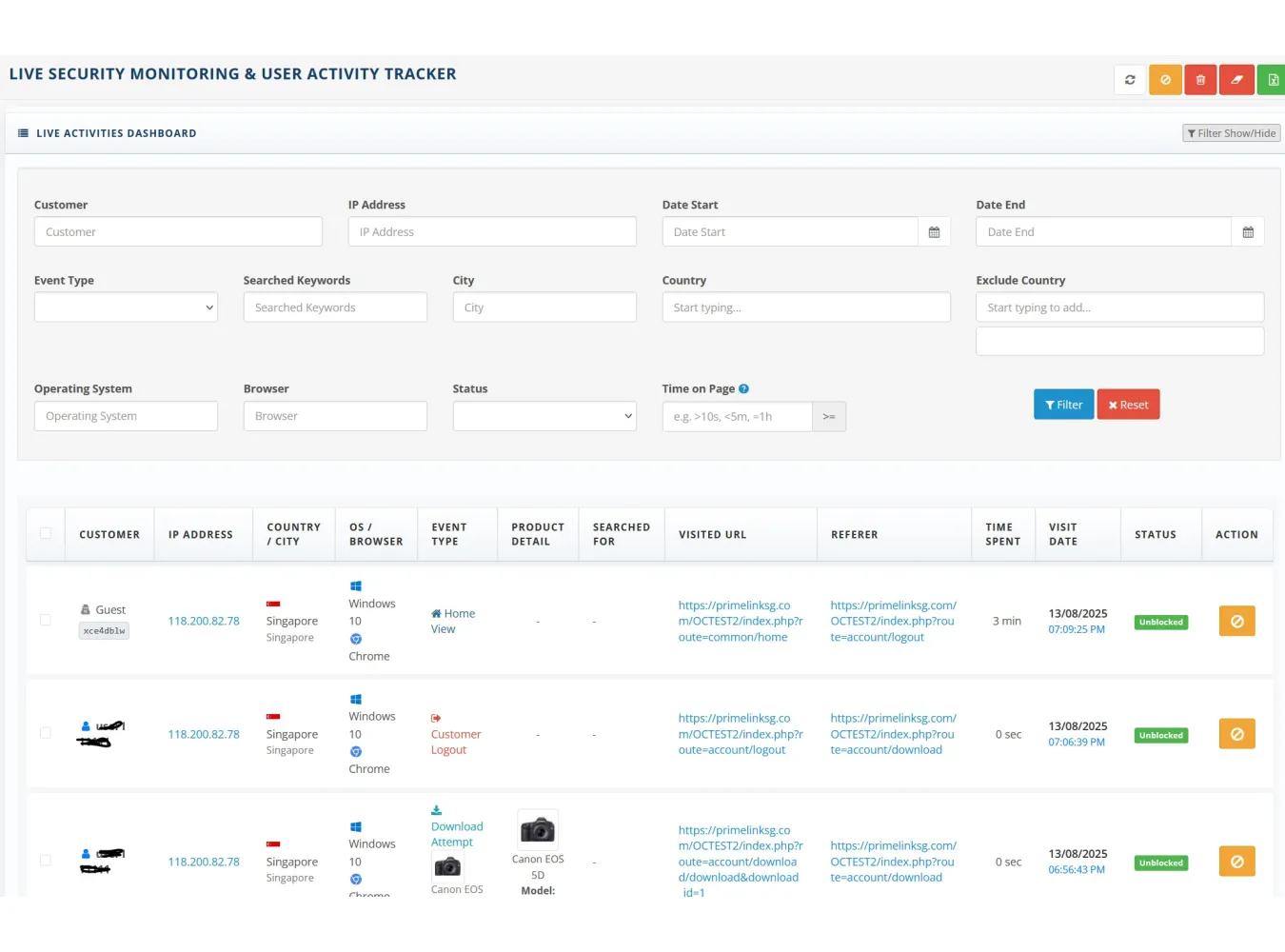
A comprehensive filter panel allows for
granular log analysis:
- Customer: Filter by customer
name (for registered users) or type (Guest, Googlebot, etc.).
- IP Address: Filter by a
specific IP.
- Date Range: Select a start and
end date.
- Event Type: Filter by a
specific event (e.g., add_to_cart, login_failed).
- Search Keywords: Filter for
specific terms used in storefront searches.
- Geolocation: Filter by Country
(inclusive) or Exclude Countries (exclusive), and City.
- Device: Filter by Operating
System or Browser.
- Status: Filter for activities
from IPs that are currently Blocked or Active.
- Time on Page: Filter for
sessions longer or shorter than a specified duration (e.g., >= 10s).
C. Logged Data Points & Event
Details
The log captures and displays a wide array
of data:
- Customer: Name, type (user,
guest, bot), and unique icons. Includes a clickable session ID badge to
copy the full ID.
- IP & Geolocation: IP
address (linked to an external lookup service), country flag, country
name, and city.
- Device: OS and Browser with
representative icons.
- Event Details: Richly
formatted event information. For example:
- Security Events: Clearly
state the rule triggered (e.g., "HTTP Flood"), the reason
(e.g., "65 requests detected"), and the matched pattern or
keyword.
- Cart/Wishlist/Compare Events: Show
the product image, name, and model.
- Admin Events: Specify the
admin user who performed the action (e.g., "Return Update by
admin").
- Address Events: Show the full
address that was added or edited.
- URL & Referrer: The full
URL visited and the referring URL.
- Time & Date: The time
spent on the previous page and the precise timestamp of the event.
D. Actions
- Block/Unblock IP: A one-click
button on every row to add or remove an IP from the firewall. The UI
updates instantly without a page reload.
- Bulk Block: Select multiple
log entries via checkboxes and block all associated unique IPs with a
single click.
- Delete: Delete selected log
entries.
- Delete All: Purge the entire
activity log.
- Export: Export the currently
filtered log view to a CSV file.
III. Abandoned Carts Tracker
This section provides tools to monitor and
manage sessions where customers added items to their cart but did not complete
the purchase.
- Session Timeline: Instead of
just a final cart state, it displays a chronological list of events within
a session. This shows what items were added, what items were removed, and,
crucially, if an order completed event occurred for that
session.
- Detailed View: For each event,
it shows the product image, name, model, quantity, and price. For
completed orders, it provides a link to the order in the admin panel.
- Action - Release Cart: A
"Release Cart" button allows the admin to remove a session from
the abandoned list. This is useful for clearing sessions that eventually
led to a purchase or are no longer relevant.
- Actions - Delete: Admins can
delete selected abandoned sessions or delete all abandoned cart records.
IV. Download Log Tracker
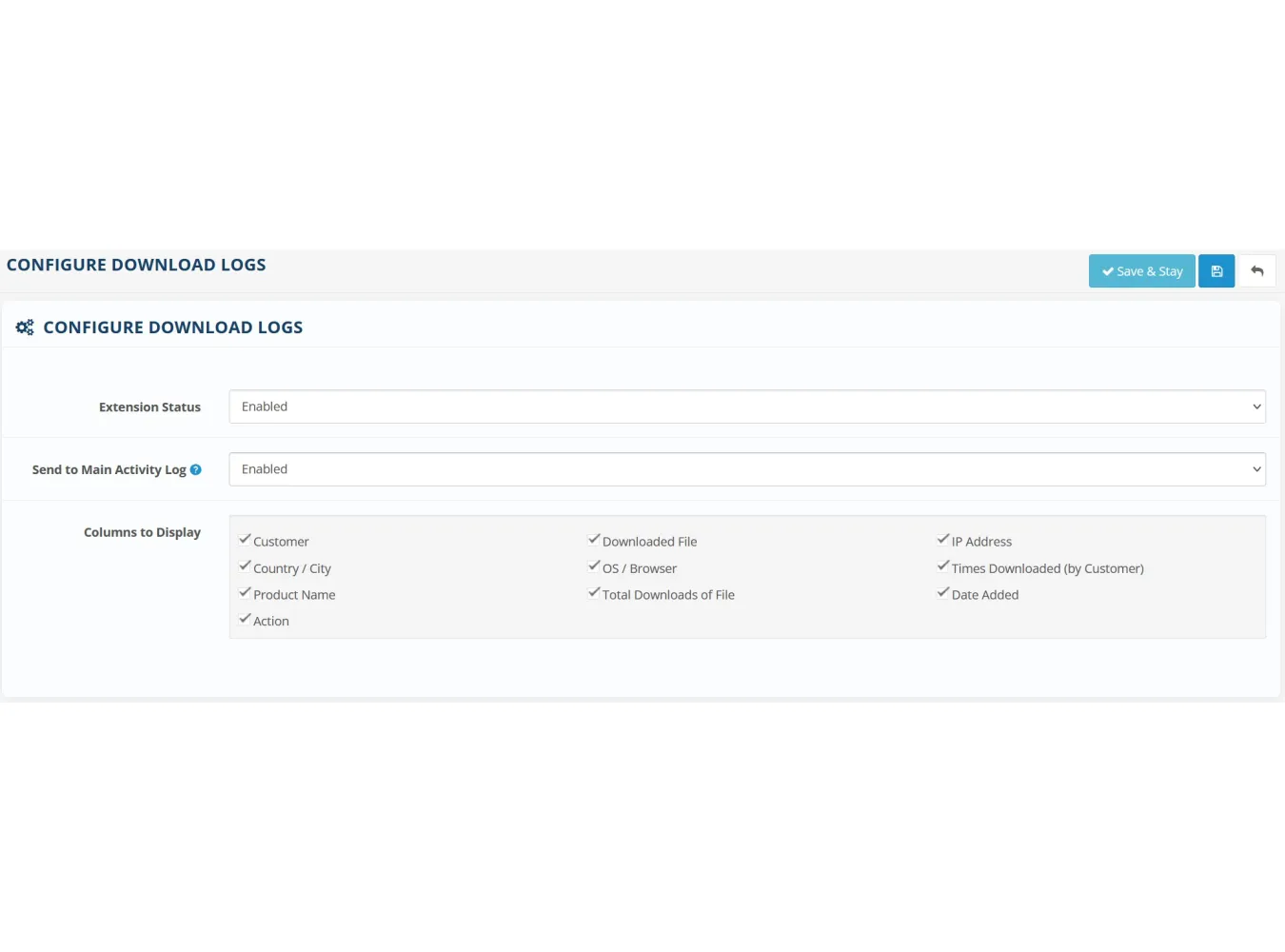
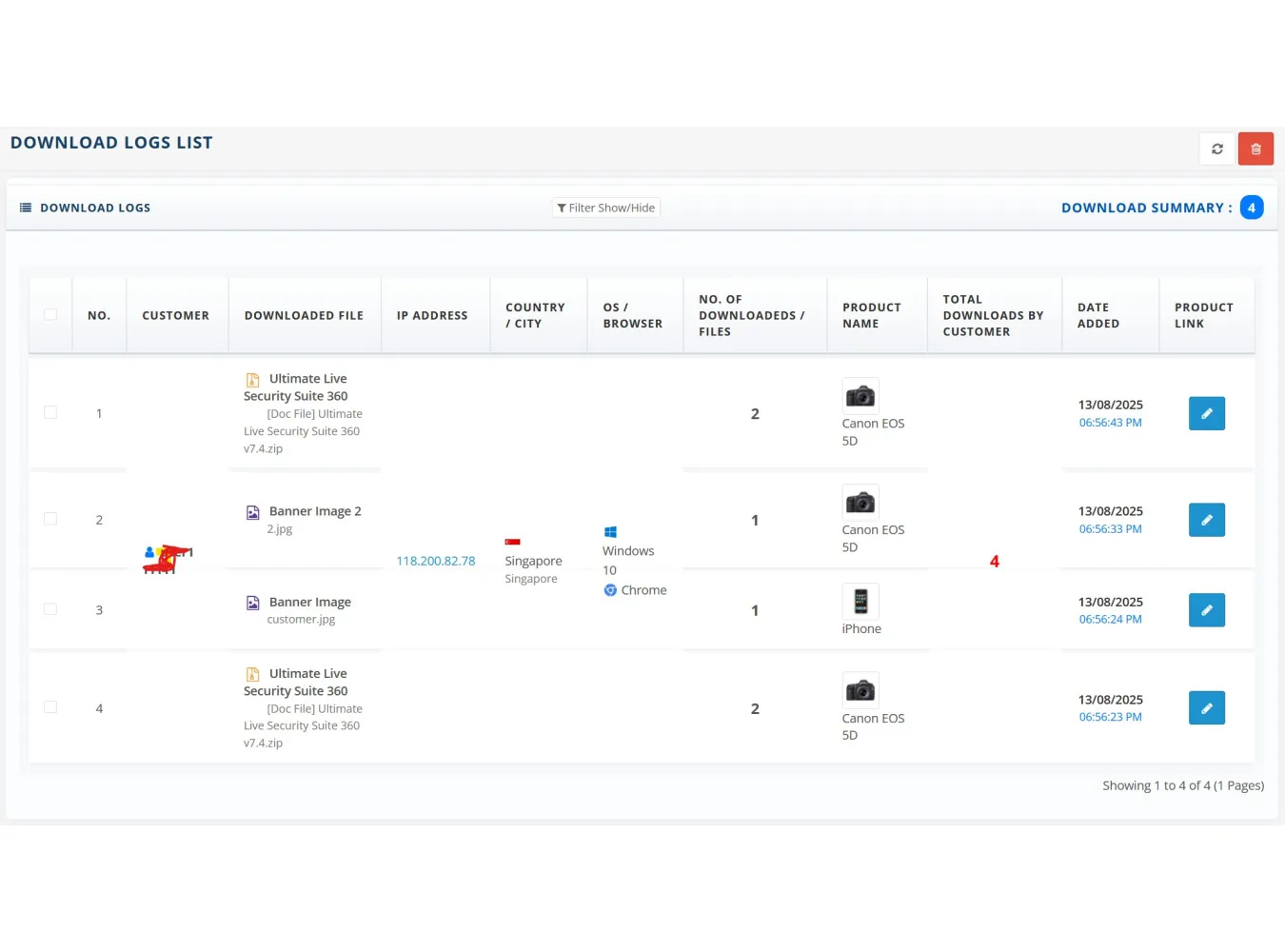
This module tracks download activity in
detail, supports filtering, grouping, auto‑updating, and integrates with your
main activity tracker (if enabled).
Key Features
l Automatic Download Logging
l Customer details (ID, name, guest/bot status)
l Downloaded file info
l Related product info and image
l IP address and geolocation (country, city)
l Device OS and browser
l Timestamp
V. Security & Administration Suite
This is the central control panel for the
extension's powerful security and administrative features, organized into tabs.
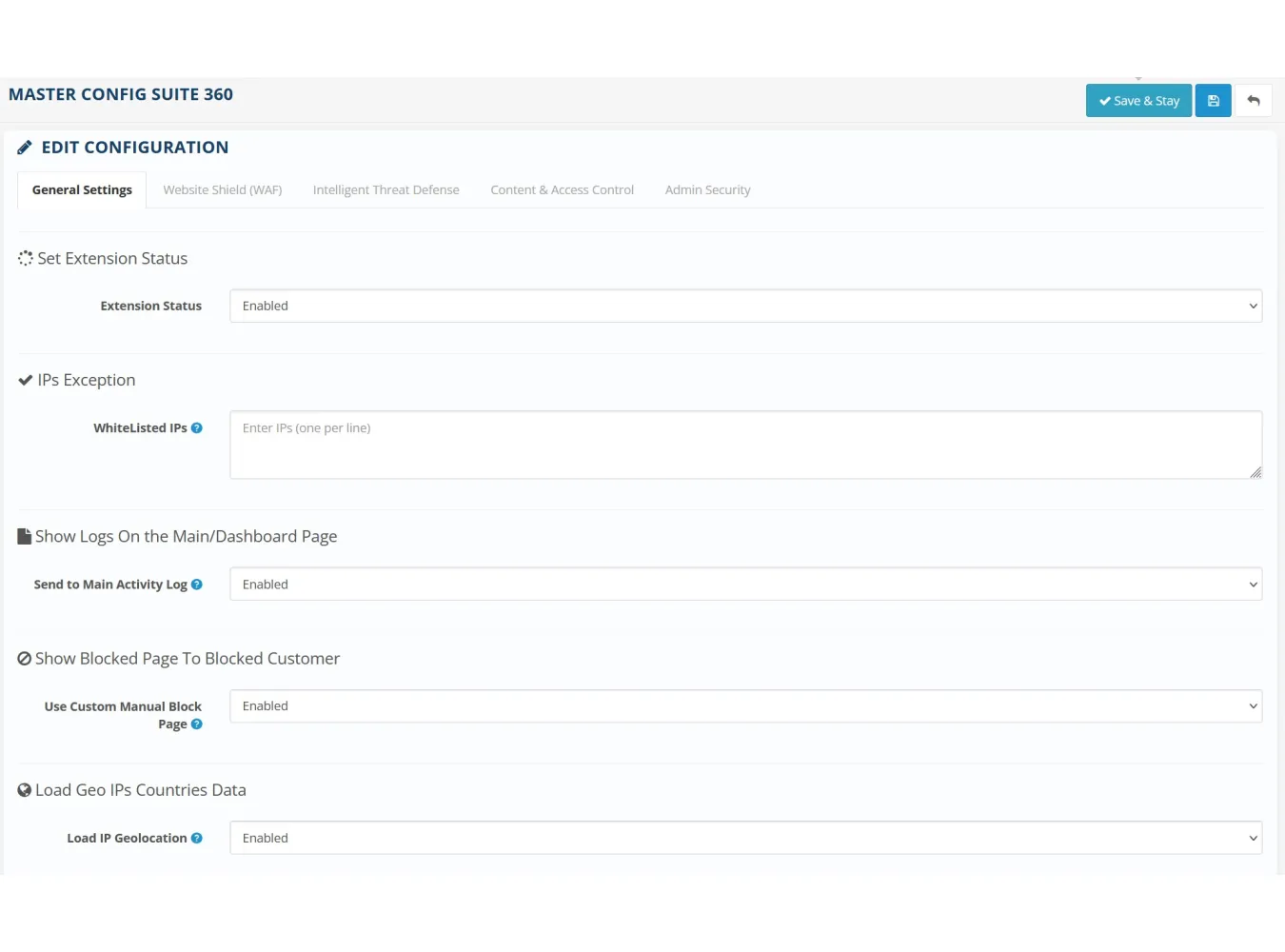
A. General & Global Settings
- Master Switch: Enable or
disable the entire extension's tracking and security features.
- Testing IP Whitelist: A
crucial list of IPs that can trigger security rules for testing purposes
without actually being blocked. Events are logged with a special
"Test Mode" note.
- Admin Security Alerts: Enable
or disable security notifications that appear at the top of the admin
panel.
- Custom Block Page: Enable or
disable a user-friendly block page for visitors, instead of a generic
"Forbidden" error.
- IP Geolocation Service: Enable
or disable the live lookup of IP address information (country/city). When
disabled, it uses cached data to improve performance.
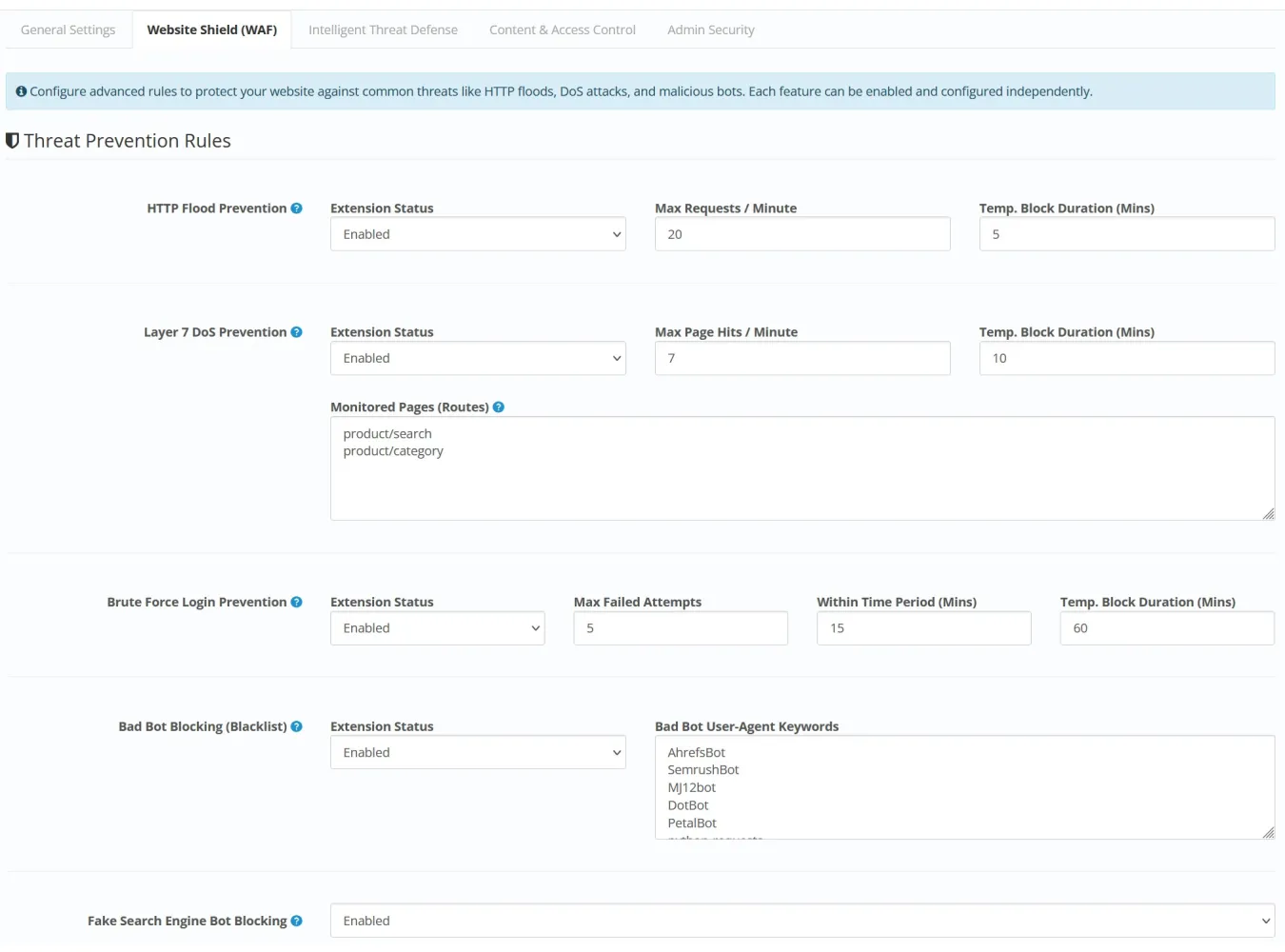
B. Website Shield (Firewall)
A multi-layered firewall to prevent common
automated attacks.
- HTTP Flood Prevention: Blocks
IPs making an excessive number of page requests in a short period.
(Configurable: requests/minute, block duration).
- Layer 7 DoS Prevention: A more
targeted flood protection for resource-intensive pages like search or
category pages. (Configurable: monitored routes, lower requests/minute,
longer block duration).
- Brute Force Prevention: Blocks
IPs that fail to log in (customer or admin) too many times. (Configurable:
max attempts, time window, block duration).
- Bad Bot Blocking: Blocks
requests from user agents containing specific keywords (e.g.,
"AhrefsBot", "python-requests"). The keyword list is
customizable.
- Fake Bot Prevention: Verifies
that traffic claiming to be from major search engines (like Googlebot) is
genuine by performing a reverse DNS lookup.
- Proxy / CDN Real IP Detection:
Accurately detects the real visitor IP behind Cloudflare/reverse proxies
so firewall rules and logs target the attacker, not the proxy itself.
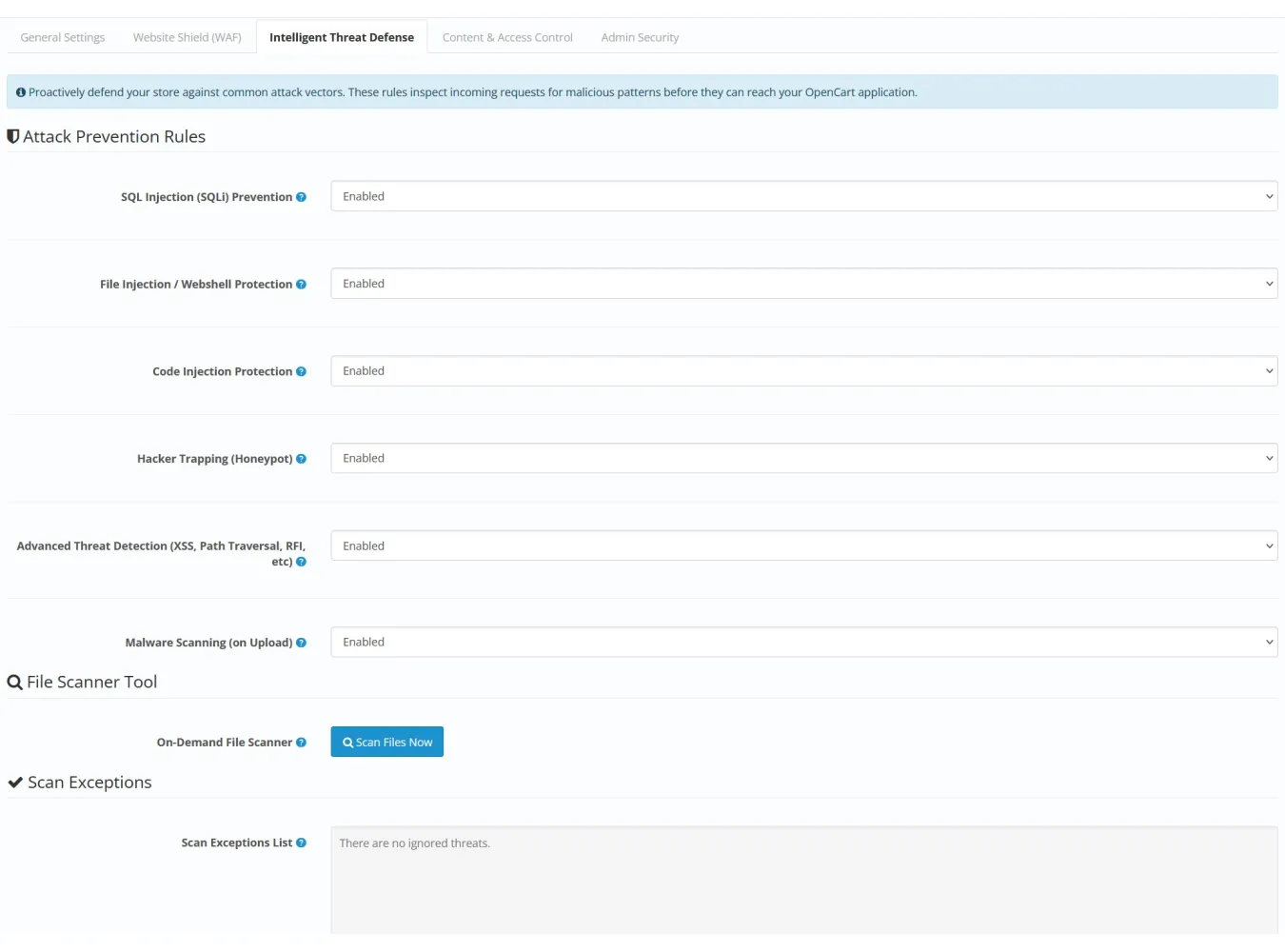
C. Intelligent Threat Defense
Proactive protection against hacking
attempts.
- Attack Prevention: Individual
toggles to enable or disable protection against:
- SQL Injection (SQLi)
- File Path Traversal / Local File Inclusion (LFI)
- Code Injection
- Hacker Trapping (Honeypot fields to trap bots)
- Advanced Threat Detection (Scans for malicious patterns in
GET/POST requests)
- Malware Scanning:
- On Upload: Automatically
scans all files uploaded through the storefront for malicious code
signatures.
- On-Demand Scanner: A powerful
tool to manually scan the entire OpenCart installation
(catalog, admin, system directories). It identifies
suspicious files based on known malware patterns and provides a detailed
report with file path, line number, severity (Critical, Warning,
Suspicious), and recommended actions.
- Scan Exceptions: Admins can
"ignore" or whitelist a specific threat in a specific file if
it's a false positive, preventing it from being flagged in future scans.
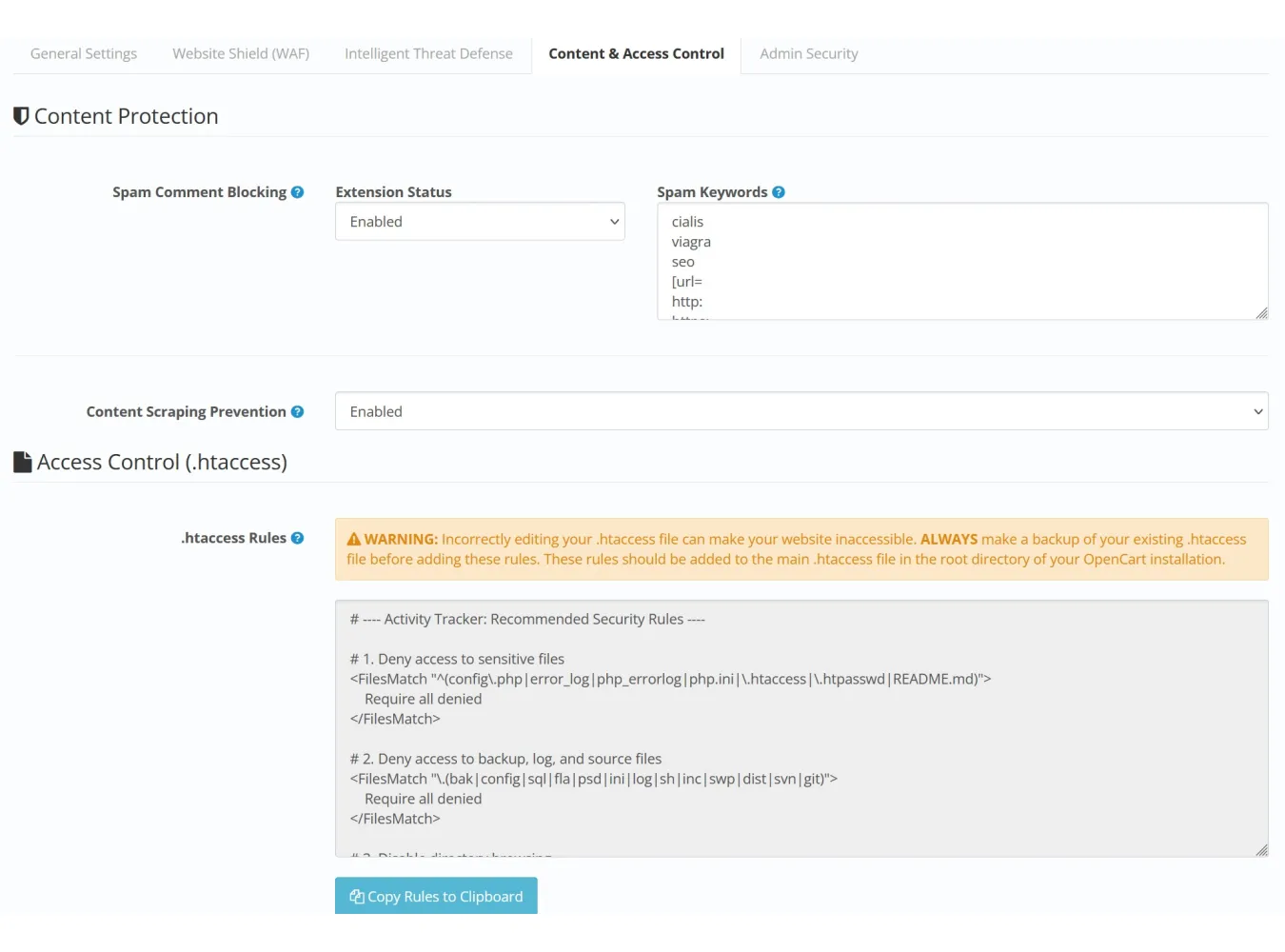
D. Content & Access Control
- Spam Comment Blocking: Prevents
reviews or comments that contain keywords from a customizable blocklist
(e.g., "cialis", "viagra", http:).
- Content Stealing Prevention: Disables
right-clicking and text selection on the storefront to deter basic content
copying.
- .htaccess Security: Generates
a set of recommended .htaccess rules to protect sensitive files
(config.php), disable directory browsing, and block direct access to
template files. Includes a one-click copy button.
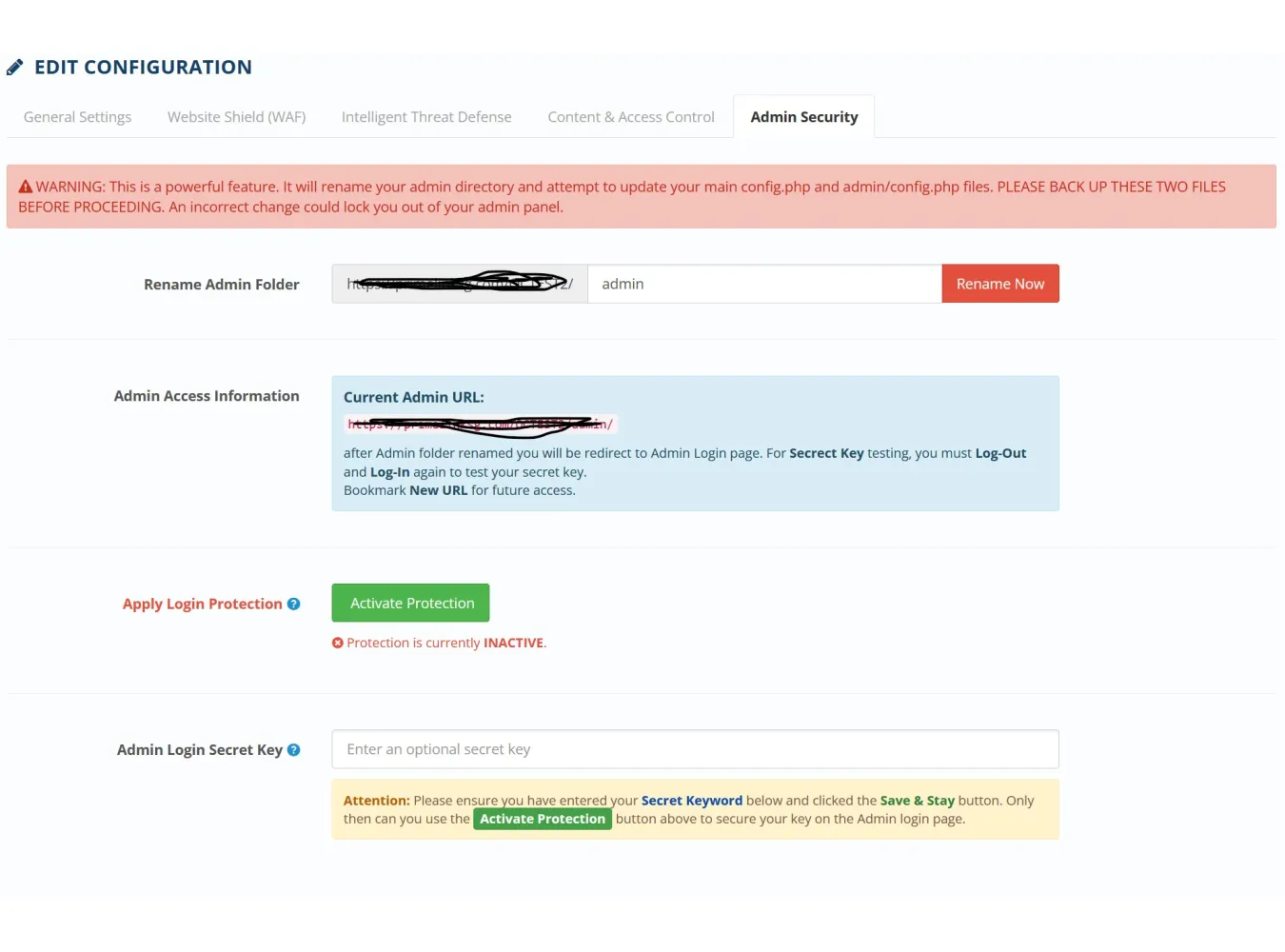
E. Secure Admin
Tools to harden the security of the
OpenCart admin area.
- Admin Folder Rename: A utility
to rename the admin directory to a custom, non-standard name,
making it harder for bots to find the login page. The tool automatically
updates the config.php files.
- Secret Key Login: An optional
second password for the admin login page.
- File Patching: A one-click
tool that safely modifies the login controller and template files to add
the secret key field. It creates backups and can revert the changes.
- This provides a robust layer of protection against brute-force
attacks, even if the admin password is weak or compromised.
VI. Use Cases
- Monitoring Store Health: An
admin can log in and immediately see today's sales, new customers, and any
security incidents from the dashboard widget, allowing for quick
assessment of the store's daily performance.
- Stores behind Cloudflare / CDN:
Ensures the WAF and activity logs correctly identify the real visitor IP
during bot spikes and Layer 7 attacks.
- Debugging Customer Issues: When
a customer reports an issue, the admin can filter the activity log by
their name to see a full timeline of their actions: what pages they
viewed, what products they added to the cart, and where they might have
encountered an error.
- Analyzing User Behavior: By
filtering for "search" events, a merchant can see what terms
customers are looking for but can't find, revealing opportunities for new
products or better SEO.
- Combating Malicious Activity: If
the store is slow, the admin can check the activity log for a high volume
of requests from a single IP. They can then use the one-click "Block
IP" button to immediately stop the suspected attack.
- Proactive Security Audit: The
admin can run the on-demand file scanner periodically to ensure no
malicious files have been uploaded to the server, providing peace of mind.
- Improving Conversion Rates: By
reviewing the Abandoned Carts log, a merchant can identify products that
are frequently added but not purchased. This might indicate an issue with
shipping costs, product price, or the checkout process for that specific
item.
- Hardening a New Installation: A
developer can use the Secure Admin and .htaccess tools to apply
fundamental security best practices to a new OpenCart store in minutes.
The Ultimate Security & Analytics Command Center for OpenCart
Transform your OpenCart admin into a powerful, real-time
command center and give your store the iron-clad protection it deserves. This
is more than just an activity logger; it's a complete, all-in-one suite
designed to provide total insight and proactive security.
See Everything, Instantly:
Stop guessing and start knowing. Our live dashboard gives
you the pulse of your store with:
• Real-Time KPI Dashboard: Watch sales, new customers, returns, low-stock
alerts, and security incidents update live.
• Live Activity Feed: See every customer action, bot visit, and security event
as it happens, with instant filtering by category.
• In-Depth Logs: Dive deep into the most detailed activity log available.
Filter by customer, IP, location, device, event, and more to understand user
behavior or investigate issues.
General Settings
IPs Exception
Show Blocked Page To Blocked Customer/Attacker
Geo IPs Countries Data
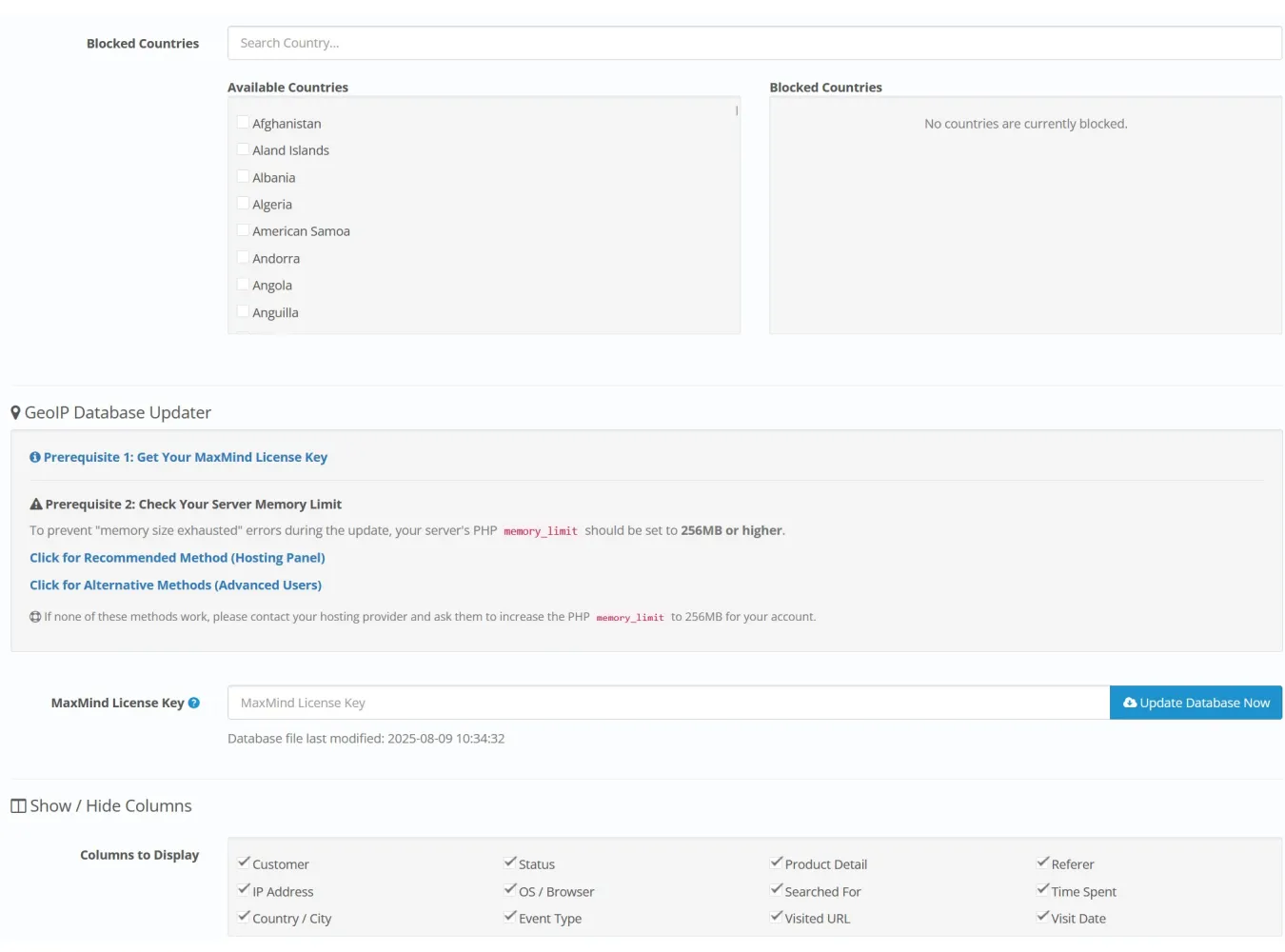
GeoIP Database Updater
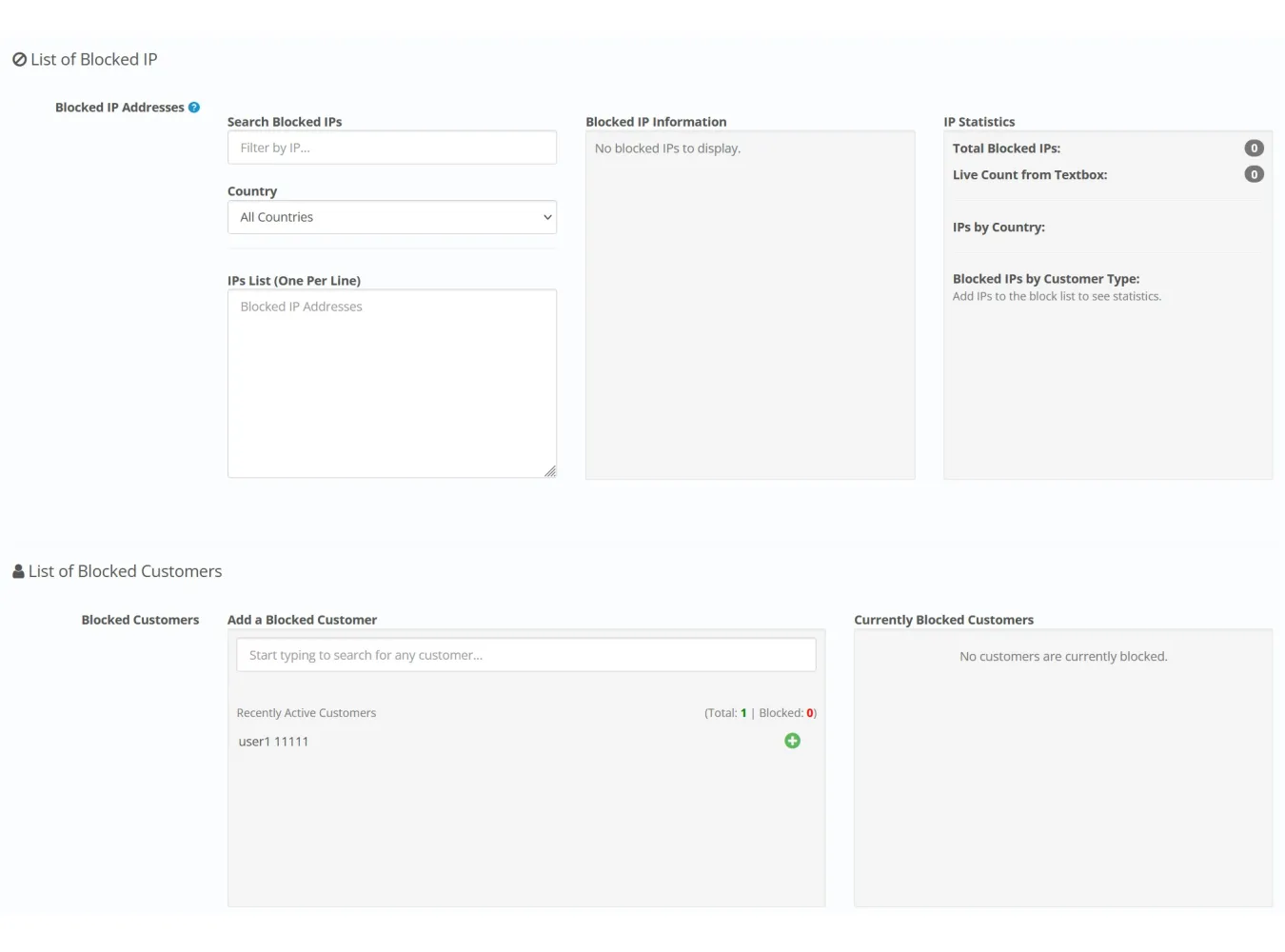
Blocked IP List
Blocked Customers List
Blocked Countries
Website Shield *(WAF)
HTTP Flood Prevention
Layer 7 DoS Prevention
Brute Force Login Prevention
Bad Bot Blocking (Blacklist)
Fake Search Engine Bot Blocking
Intelligent Threat Defense
SQL Injection (SQLi) Prevention
File Injection / Webshell Protection
Code Injection Protection
Hacker Trapping (Honeypot)
Advanced Threat Detection (XSS, Path Traversal, RFI, etc)
Malware Scanning (on Upload)
On-Demand File Scanner
Scan Exceptions List
Content & Access Control
Spam Comment Blocking
Content Scraping Prevention
Access Control (.htaccess)
Admin Security
Rename Admin Folder
Login Protection
Admin Login Secret Key
Ultimate Live Security Suite 360 v10.6 for OC 3.X
Related Products

Advance Permission Override
Normal 0 false false false EN-US JA X-NONE Extension Description Installer Permission Override..
SGD$0.00

New Tab In Product Page
Normal 0 false false false EN-US JA X-NONE Extension Description The New Tab in Product Page e..
SGD$0.00

Fix action.php error
Extension Description This is a small but powerful utility extension designed to solve one ver..
SGD$0.00

Quick Product Editor
Description The Quick Product Editor is a streamlined efficiency tool for OpenCart administrators. I..
SGD$0.00

Performance Pilot
Performance Pilot v2.9 (OC 3.X) The Ultimate OpenCart Speed & Optimization Suite Description Is ..
SGD$110.00